TovaIDE-STM - STM32 Development Environment User Guide

Overview

TovaIDE-STM is an integrated development environment for STM32 microcontroller development on Visual Studio Code. It integrates CubeMX, build system, flash programming, debugging, and hardware configuration tools for efficient embedded development.

If you're unfamiliar with STM32, all I can say is "good luck."

This was created to be easy to use for those familiar with CubeIDE.

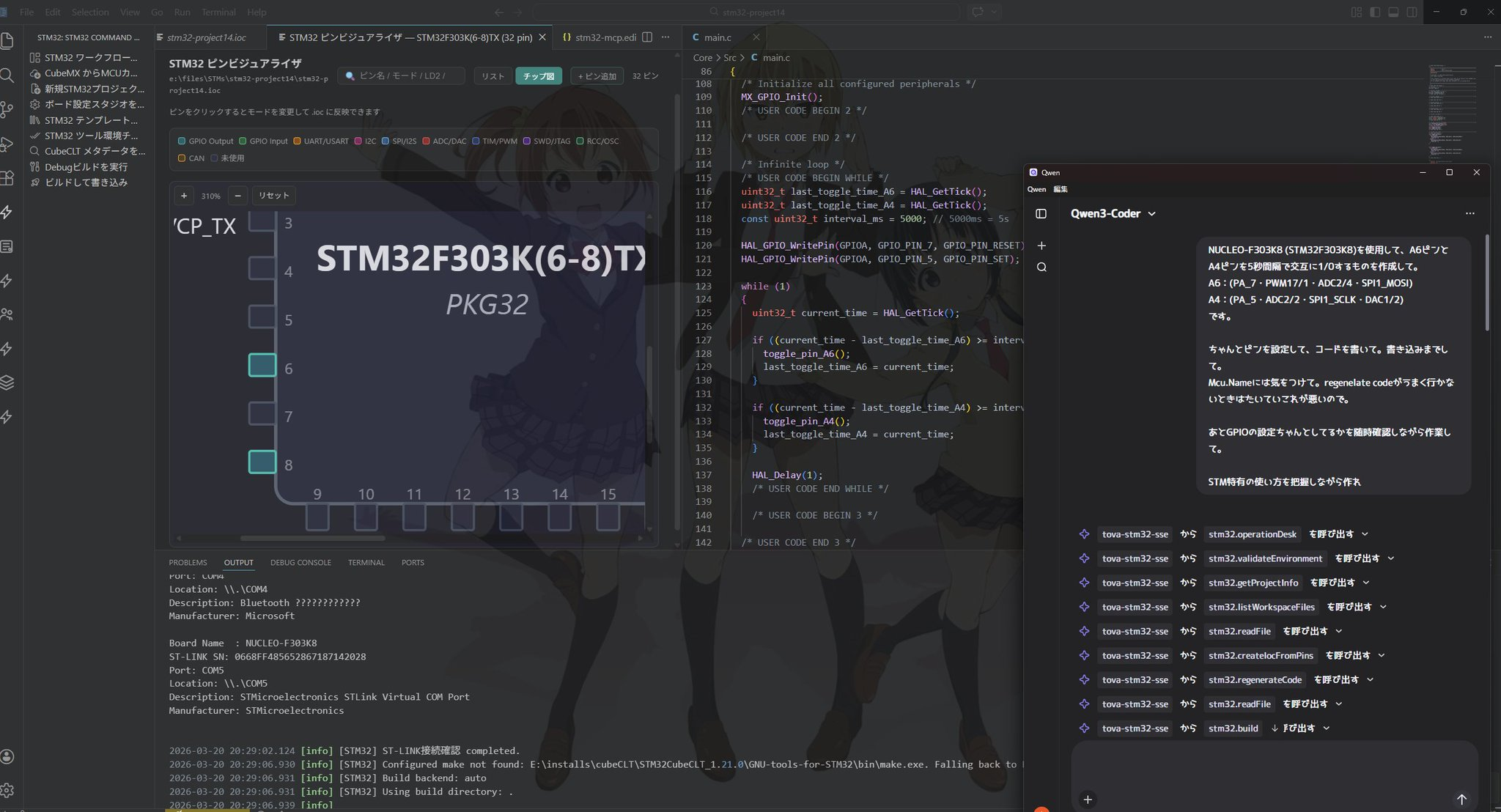
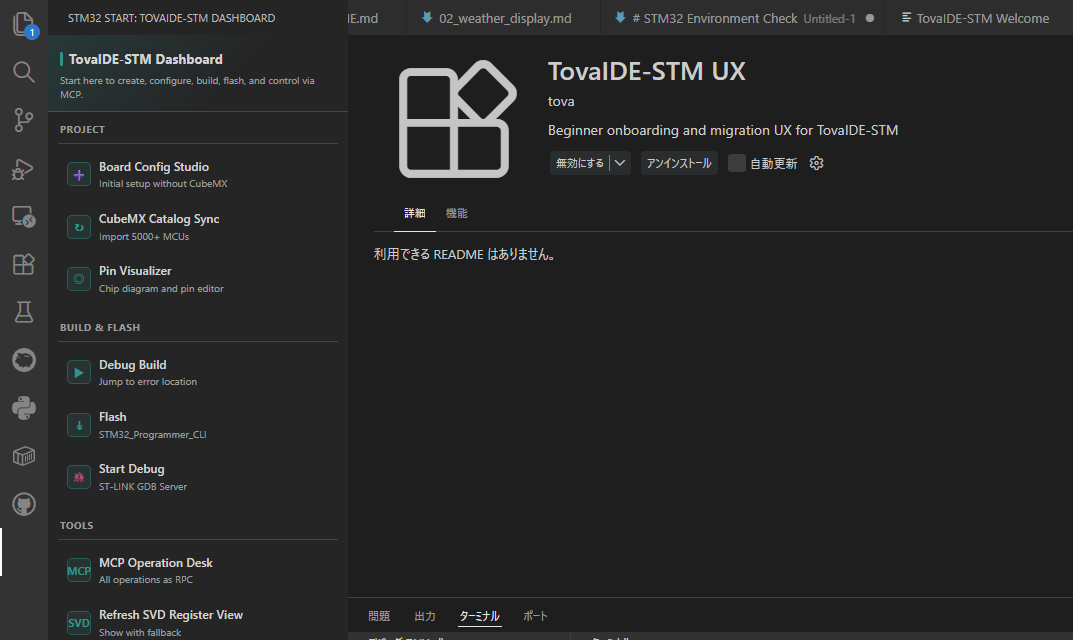
Main interface

Key Features

Installation

1. Quick Installation

2. Use the stable version

Initial Setup

1. Install Required Tools

Install the following tools before starting:

2. Configure Environment Settings

From the command palette (Ctrl+Shift+P), run:

Open environment settings with:

STM32: Open STM32 Environment Settings

Configure paths to CubeMX, GCC, GDB, and ST-LINK tools.

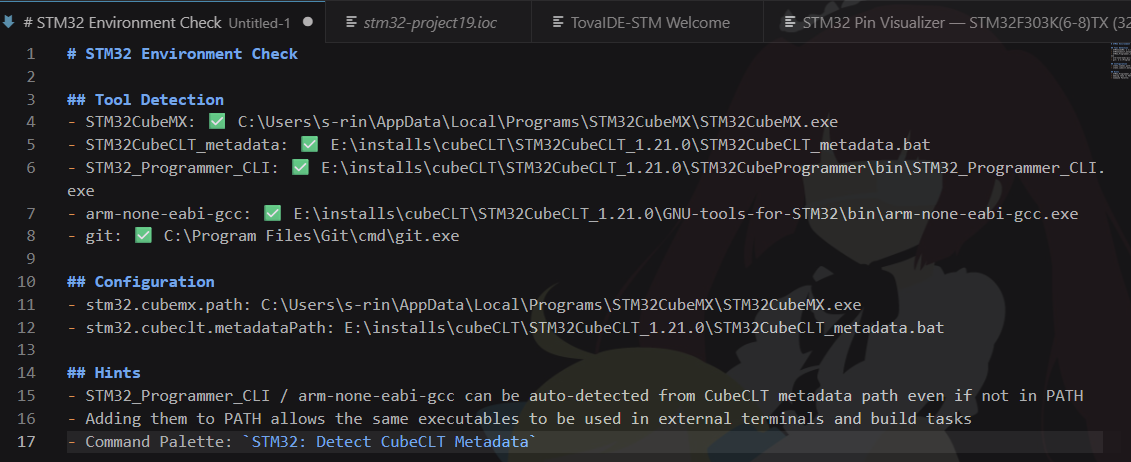
3. Environment Check

STM32: Run Environment Check

This verifies installation status and configuration, highlighting any missing tools.

Environment check results

4. Detect CubeCLT Metadata

After installing CubeCLT, auto-detect it with:

STM32: Detect CubeCLT Metadata

Alternatively, click CubeMX Catalog Sync from the Dashboard.

Creating a Project

Method 1: Create New Project

  1. From the command palette, run STM32: New Project
  2. Select Board or MCU(e.g., STM32F401RE)
  3. Enter project name
  4. Select destination folder
  5. CubeMX will launch automatically and create the IOC file

Method 2: Import CubeIDE Project

  1. From the command palette, run STM32: Import CubeIDE Project
  2. Select an existing CubeIDE project folder
  3. Choose "Open Folder" or "Add to Workspace"

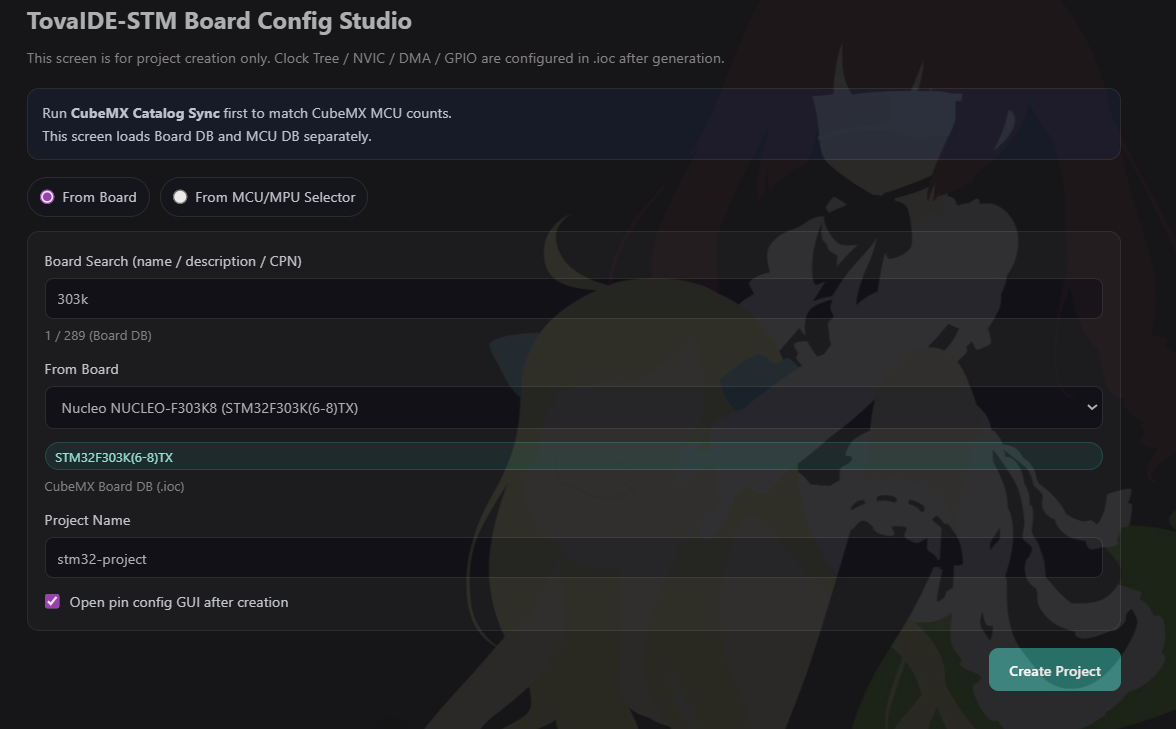
Method 3: Create from Board Config Studio (recommended)

  1. Open "TovaIDE-STM Dashboard" in the sidebar
  2. Click "Open Board Config Studio"
  3. Select a board and configure pin assignments
  4. Create project
  5. Board config studio

Basic Development Flow

1. Hardware Configuration (IOC File Editing)

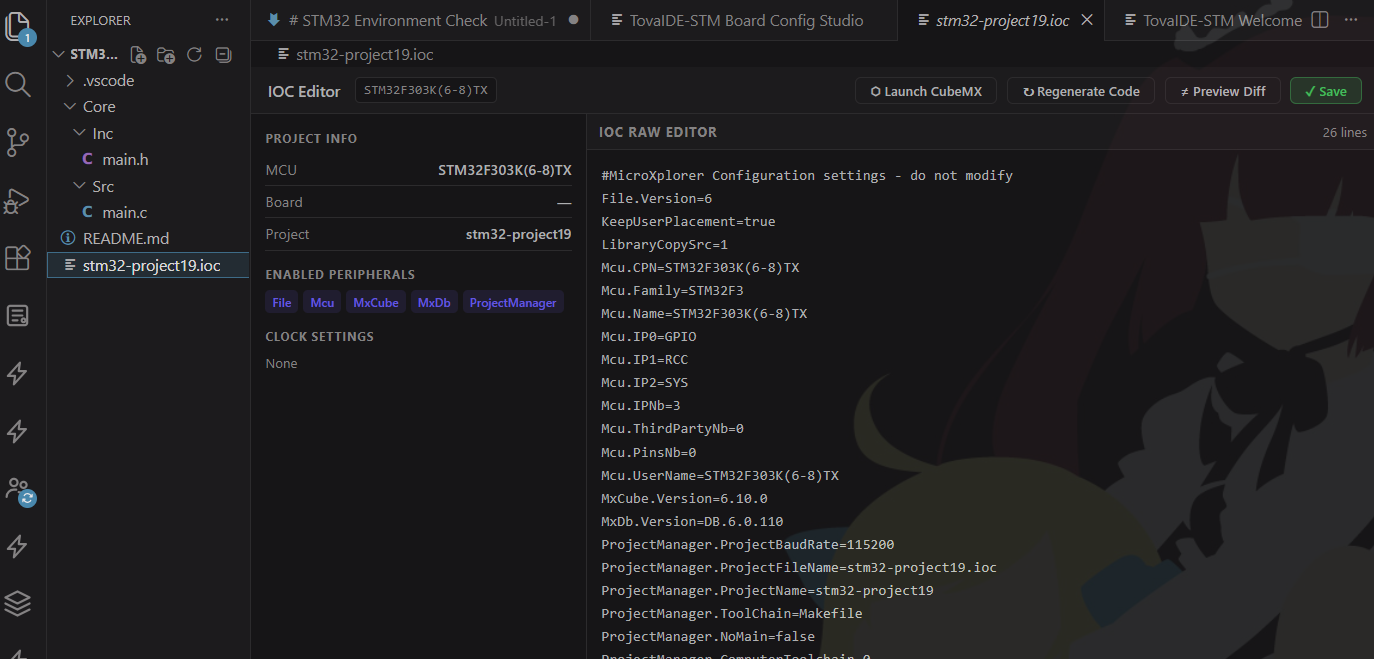
  1. Click the .ioc file in your project, then click "Launch CubeMX"
  2. Launch CubeMX
  3. The IOC editor opens (or CubeMX if configured)
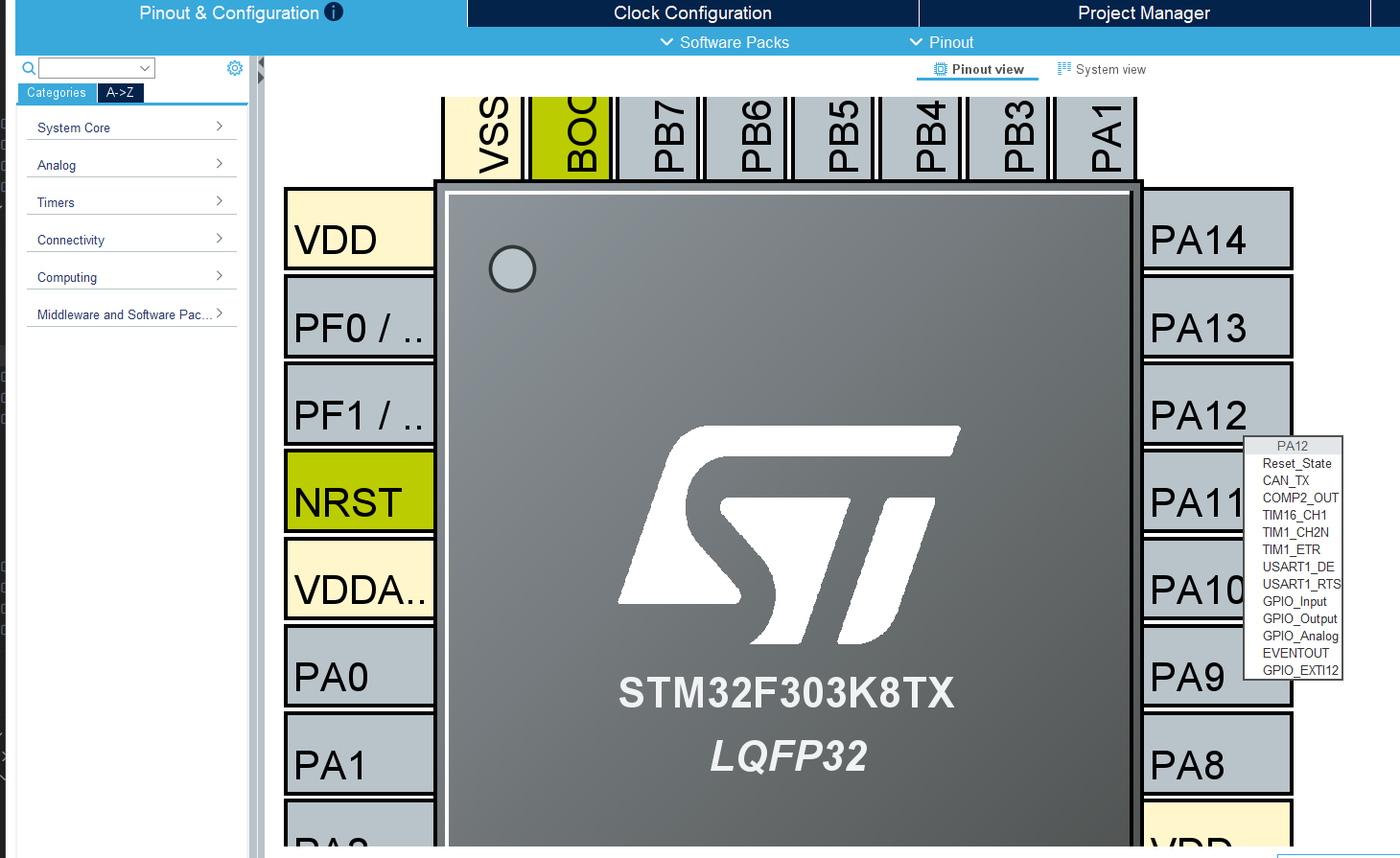
  4. CubeMX
  5. Configure pin assignments, clock settings, and peripherals
  6. Code generation runs automatically after saving

2. Code Generation

Code generation runs automatically when saving the IOC file. To manually regenerate:

STM32: Regenerate Code from IOC

Note: Code within USER CODE sections is automatically protected and restored.

3. Write User Code

Write your code in the generated source files (e.g., Core/Src/main.c) within the USER CODE sections:

4. Build

Build using one of these methods:

Build output appears in the output panel. If errors occur, use STM32: Jump to First Build Error to navigate to the error location.

4a. If Build Fails - Use CubeMX Makefile Generation

If the build fails and you need to regenerate the Makefile:

  1. Run STM32: Open STM32 Environment Settings and verify tool paths
  2. Open the IOC file in CubeMX: STM32: Open CubeMX
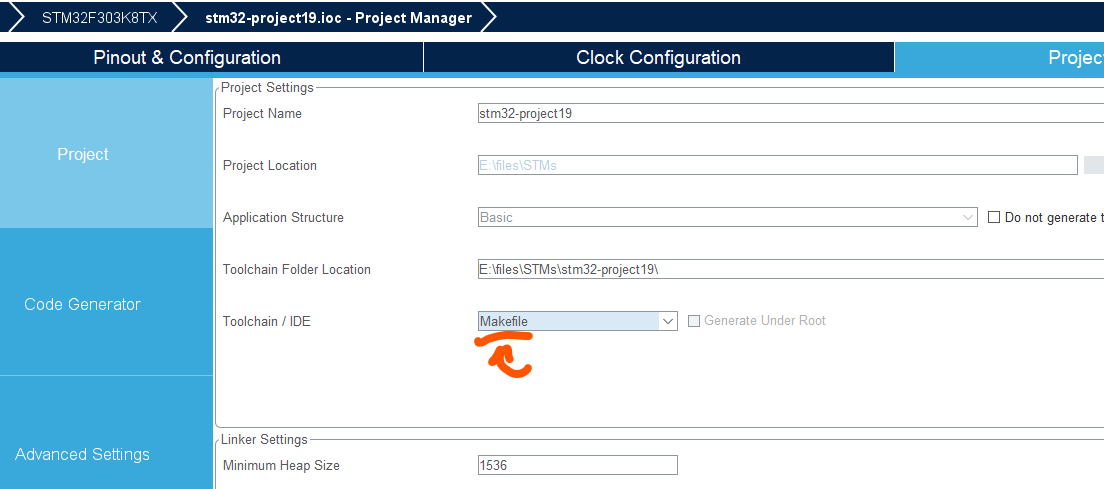
  3. In CubeMX, go to Project Manager > Project
  4. Ensure "Makefile" is selected as the toolchain
  5. Makefile selection in CubeMX
  6. Click Generate
  7. Return to VS Code and retry the build

5. Flash Programming

  1. Connect ST-LINK to PC and board
  2. From command palette, run STM32: Flash
  3. Or use STM32: Build and Flash to build and program in one step

6. Debugging

  1. Set breakpoints by clicking on line numbers in the editor
  2. Press F5 or run STM32: Start Debug
  3. Use the debug toolbar for step execution, variable inspection, etc.
  4. Stop debugging: STM32: Stop Debug or Shift+F5

Useful Features

Pin Visualizer

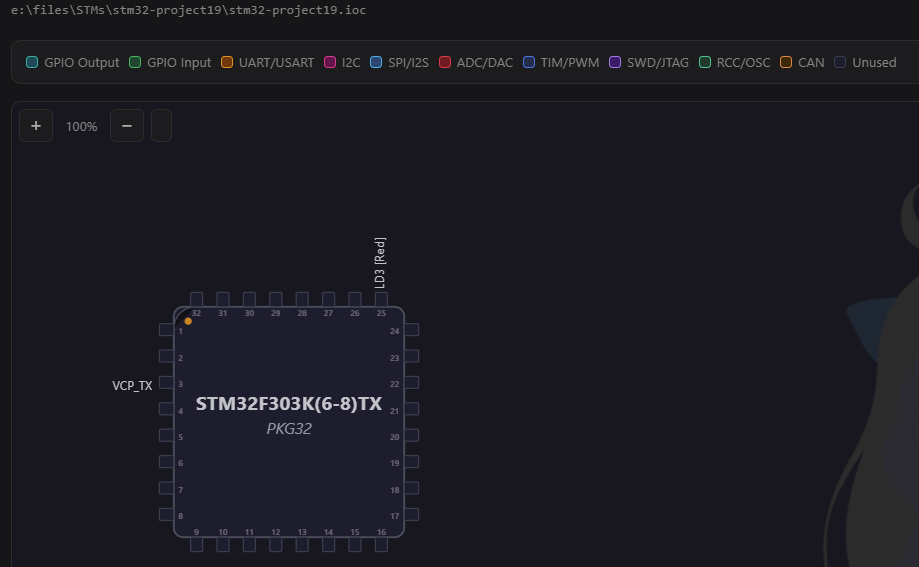
Visually confirm pin assignments configured in the IOC file:

STM32: Open Pin Visualizer

Pin functions are displayed on the MCU package diagram.

Pin visualizer

Code Size Analysis

Analyze memory usage in detail after building:

STM32: Show Code Size Analysis

Sizes are displayed in table format by section and symbol.

Fault Analyzer

Analyze register values when a HardFault occurs:

  1. Run STM32: Show Fault Analyzer
  2. Enter CFSR register value (e.g., 0x00008200)
  3. Enter HFSR register value (e.g., 0x40000000)
  4. Fault cause is displayed with detailed explanation

Live Expressions (Real-time Variable Monitoring During Debug)

  1. Open the "Live Expressions" view in the sidebar
  2. Click the "+" button to add an expression (e.g., *((uint32_t*)0x40021000))
  3. Values update automatically during debugging

SVD Register View

View peripheral registers in a hierarchy during debugging:

  1. Open the "SVD Registers" view in the sidebar
  2. Expand peripheral names to view register values
  3. Click refresh to get the latest values

SWV/ITM Trace

Display printf output in real-time via SWO:

  1. Configure stm32.debug.swv.startCommands in settings
  2. After starting debug, run STM32: SWV Start
  3. Logs appear in the "STM32 SWV/ITM" output panel
  4. Stop with: STM32: SWV Stop

Command Reference

Command Description
STM32: New ProjectCreate a new STM32 project
STM32: Import CubeIDE ProjectImport an existing CubeIDE project
STM32: Build (Debug)Execute a Debug build
STM32: FlashProgram the device via ST-LINK
STM32: Build and FlashBuild and program in one step
STM32: Start DebugStart a debug session
STM32: Stop DebugStop the debug session
STM32: Regenerate Code from IOCRegenerate code from IOC file
STM32: Open IOC EditorOpen the IOC editor
STM32: Open Pin VisualizerOpen the pin visualizer
STM32: Show Code Size AnalysisDisplay code size analysis
STM32: Show Fault AnalyzerOpen the HardFault analyzer tool
STM32: Run Environment CheckVerify development environment configuration
STM32: Detect CubeCLT MetadataAuto-detect CubeCLT installation
STM32: Open STM32 Environment SettingsConfigure tool paths and settings
STM32: Jump to First Build ErrorNavigate to the first build error
STM32: Open CubeMXLaunch CubeMX for the current project
STM32: SWV StartStart SWV/ITM trace
STM32: SWV StopStop SWV/ITM trace
STM32: SWV Show LogDisplay SWV log

Configuration

Key Settings (settings.json)

{
  "stm32.cubemx.executable": "C:/ST/STM32CubeMX/STM32CubeMX.exe",
  "stm32.cubeclt.gccPath": "C:/ST/STM32CubeCLT/GNU-tools-for-STM32/bin/arm-none-eabi-gcc.exe",
  "stm32.cubeclt.gdbPath": "C:/ST/STM32CubeCLT/GNU-tools-for-STM32/bin/arm-none-eabi-gdb.exe",
  "stm32.cubeclt.stlinkPath": "C:/ST/STM32CubeCLT/STLink-gdb-server/bin/ST-LINK_gdbserver.exe",
  "stm32.build.makeExecutable": "make",
  "stm32.debug.svdPath": "${workspaceFolder}/STM32F401.svd",
  "stm32.debug.liveExpressions": [
    "*((uint32_t*)0x40021000)",
    "SystemCoreClock"
  ],
  "stm32.debug.swv.startCommands": [
    "monitor SWV port 0 on",
    "monitor SWV start"
  ],
  "stm32.debug.swv.stopCommands": [
    "monitor SWV stop"
  ]
}

Troubleshooting

Build Fails

Flash Programming Fails

Debug Session Won't Start

USER CODE Disappears After Code Generation

Frequently Asked Questions

Q: What is the difference between CubeMX and CubeCLT?

A: CubeMX is a GUI-based configuration tool (IOC file editing, code generation). CubeCLT is a command-line tool suite (GCC, GDB, ST-LINK). Both are required.

Q: How do I build Release instead of Debug?

A: Currently only Debug builds are supported. For Release builds, edit the Makefile directly.

Q: How do I switch between multiple STM32 boards?

A: Add multiple project folders to your workspace and switch between them as needed.

Q: What if arm-none-eabi-gcc is not found?

A: Ensure it is installed as part of CubeCLT or separately. Configure the correct path in STM32 Environment Settings.

Q: Can I use this offline?

A: Yes. Build, flash programming, and debugging all work offline. No internet connection is required.